<img height="1" width="1" style="display:none;" alt="" src="https://px.ads.linkedin.com/collect/?pid=8366258&amp;fmt=gif">
Skip to content

KPI Snowflake Data Governance App

expertise
Efficient Data Classification and Risk Mitigation in Snowflake
imags will be here
OVERVIEW

Data classification is a key element in the data life cycle management for any organization. It helps organizations comply with regulatory requirements like HIPPA imposed by countries, states or their own regulatory body.


Risks in the mishandling of sensitive data can be mitigated if it is identified, masked, and has restricted access. Secure data practices build the trust of customers and clients of an organization. 

imags will be here
KPI’s data governance app helps in the classification of the structured data residing within Snowflake. It leverages Snowflake's built-in capabilities to classify and identify columns for enabling masking or row access policies.
Intuitive dashboards help users to see how their sensitive data is spread across different databases and tables. Users can add trackers to schemas to track any alterations to the tables in the schema so that they can re-classify those tables for any sensitive data.
imags will be here
DASHBOARD DETAILS

The app has the following dashboard pages:

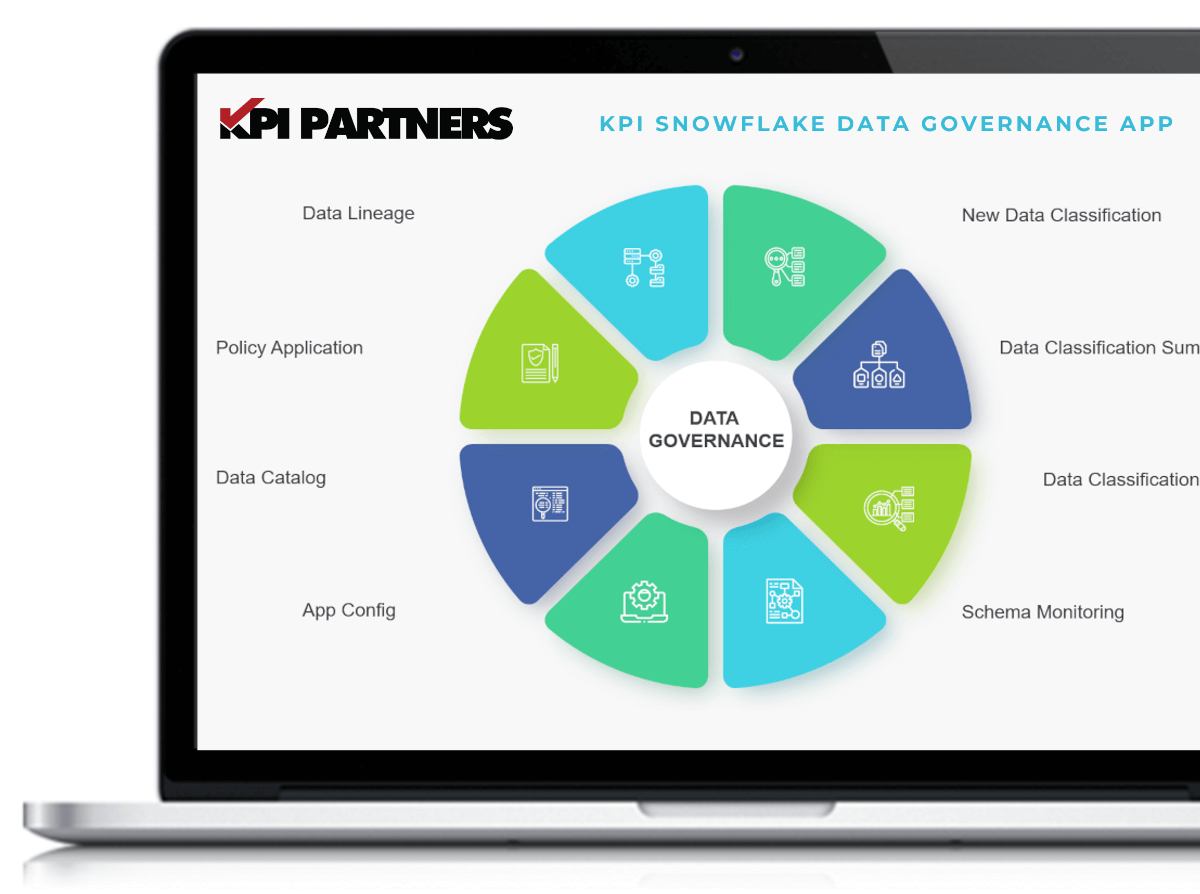
  • New Data Classification: The user can run the data classification job on the tables from this page. The columns in the table are broadly classified as identifiers, quasi-identifiers, and sensitive.
  • Data Classification Summary: Summary view of objects and columns classified. A classified object/column is one on which the classification job has been executed and a categorized object/column has PII or sensitive data as per Privacy Categories defined by Snowflake.
  • Data Classification Inquiry: This page gives detailed information on the classified columns and shows only those columns that have been categorized.
  • Policy Application: This page gives users the ability to generate SQL to apply masking and row access policies to the categorized column. ** Currently conditional masking policies are not supported.
  • Data Lineage: The user can choose an object and find out its references. Thus, enabling them to find out the sensitive data trail and take appropriate actions.
  • Data Catalog: The user can select a schema and find out if data classification has been executed for the objects in that schema or not.
  • Schema Monitoring: Trackers can be set on the schema to identify any modifications to existing tables or new additions in a schema. Tracking jobs is part of the incremental schedule.
  • App Settings: This page has options to trigger full load, set up incremental task schedule, and the option to suspend or resume the incremental task. The help section on this page describes each of these as these settings are necessary for the smooth running of the app. The incremental task schedule does full load or incremental load based on the object type.

Let’s Connect

Get in touch so we can start working together.

info@kpipartners.com

kpi-top-up-button