

_1-resized-600.gif)
Learn More

by Shiva Molabanti
Prerequisites:
- OBIEE 11.1.1.7.1 (If your version of Oracle BI EE is not 11.1.1.7.1, download Patch 16556157: OBIEE...
Learn More
by Shiva Molabanti
Prerequisites:
- OBIEE 11.1.1.7.1 (If your version of Oracle BI EE is not 11.1.1.7.1, download Patch 16556157: OBIEE BUNDLE PATCH 11.1.1.7.1 from My Oracle Support).
- To support Oracle BI Mobile App Designer with Oracle BI Web Catalog, Apply OBIEE 11.1.1.7.1 MLR Patch 17004920.
- Download Oracle BI Mobile App Designer Patch 17220944 from My Oracle Support.
Installation Steps:
- Stop All OBIEE 11G services (Weblogic Admin Server, Managed Server and OPMN services).
- Apply OBIEE 11.1.1.7.1 MLR Patch 17004920 using OPatch Utility.
- Apply Oracle BI Mobile App designer Patch 17220944 using OPatch Utility.
- Deploy the Oracle BI Mobile App Designer (MAD) manually using Weblogic Configuration Assistant as shown below.
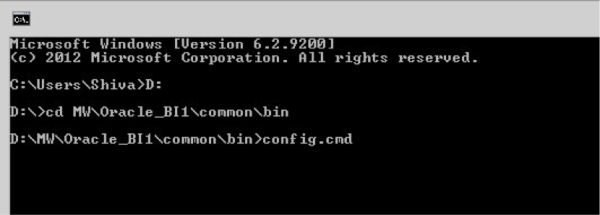
- Open Command prompt window and Navigate to: <MW_HOME>\Oracle_BI1\common\bin
- Run "config.bat" to start the WebLogic Configuration Assistant Tool.
On welcome screen, select ‘"Extend an existing WebLogic domain" and click "Next."
by Kurt Wolff
It may be strange to be writing this with the intention of posting to a blog, but I thought someone should step back a...
Learn More
by Kurt Wolff
It may be strange to be writing this with the intention of posting to a blog, but I thought someone should step back a minute and issue a few words of warning about information that can be found on the web about Oracle BI EE.


by Shiva Molabanti
Prerequisites:
- OBIEE 11.1.1.7.1 (If your version of Oracle BI EE is not 11.1.1.7.1, download Patch 16556157: OBIEE BUNDLE PATCH 11.1.1.7.1 from My Oracle Support).
- To support Oracle BI Mobile App Designer with Oracle BI Web Catalog, Apply OBIEE 11.1.1.7.1 MLR Patch 17004920.
- Download Oracle BI Mobile App Designer Patch 17220944 from My Oracle Support.
Installation Steps:
- Stop All OBIEE 11G services (Weblogic Admin Server, Managed Server and OPMN services).
- Apply OBIEE 11.1.1.7.1 MLR Patch 17004920 using OPatch Utility.
- Apply Oracle BI Mobile App designer Patch 17220944 using OPatch Utility.
- Deploy the Oracle BI Mobile App Designer (MAD) manually using Weblogic Configuration Assistant as shown below.
- Open Command prompt window and Navigate to: <MW_HOME>\Oracle_BI1\common\bin
- Run "config.bat" to start the WebLogic Configuration Assistant Tool.
On welcome screen, select ‘"Extend an existing WebLogic domain" and click "Next."
by Kurt Wolff
It may be strange to be writing this with the intention of posting to a blog, but I thought someone should step back a minute and issue a few words of warning about information that can be found on the web about Oracle BI EE.
