Blog
by Shiva Molabanti
Prerequisites:
- OBIEE 11.1.1.7.1 (If your version of Oracle BI EE is not 11.1.1.7.1, download Patch 16556157: OBIEE...
by Shiva Molabanti
Prerequisites:
- OBIEE 11.1.1.7.1 (If your version of Oracle BI EE is not 11.1.1.7.1, download Patch 16556157: OBIEE BUNDLE PATCH 11.1.1.7.1 from My Oracle Support).
- To support Oracle BI Mobile App Designer with Oracle BI Web Catalog, Apply OBIEE 11.1.1.7.1 MLR Patch 17004920.
- Download Oracle BI Mobile App Designer Patch 17220944 from My Oracle Support.
Installation Steps:
- Stop All OBIEE 11G services (Weblogic Admin Server, Managed Server and OPMN services).
- Apply OBIEE 11.1.1.7.1 MLR Patch 17004920 using OPatch Utility.
- Apply Oracle BI Mobile App designer Patch 17220944 using OPatch Utility.
- Deploy the Oracle BI Mobile App Designer (MAD) manually using Weblogic Configuration Assistant as shown below.
- Open Command prompt window and Navigate to: <MW_HOME>\Oracle_BI1\common\bin
- Run "config.bat" to start the WebLogic Configuration Assistant Tool.
On welcome screen, select ‘"Extend an existing WebLogic domain" and click "Next."
by Veera Reddy Ramidi
This blog introduces and explains the detailed step by step process for executing the Domain Load to Business...
by Veera Reddy Ramidi
This blog introduces and explains the detailed step by step process for executing the Domain Load to Business Analytics Warehouse. Here, we are illustrating for the Student information Analytics data using the new OBIA 11g which is supported only for PeopleSoft 9.0 Campus Solutions. This blog can be used similarly for any other Analytics using OBIA 11g.
The BI Apps from Oracle present customers with a nice head start to getting their BI environment up and running. But for many customers,...
The BI Apps from Oracle present customers with a nice head start to getting their BI environment up and running. But for many customers, their user community demands lighting-fast speeds while running dashboards, reports and ad-hoc queries.
by Shiva Molabanti
Version 11.1.1.7.0 of Oracle Business Intelligence Enterprise Edition (OBIEE) Supports Multiple-Source Session Variables
by Shiva Molabanti
Version 11.1.1.7.0 of Oracle Business Intelligence Enterprise Edition (OBIEE) Supports Multiple-Source Session Variables
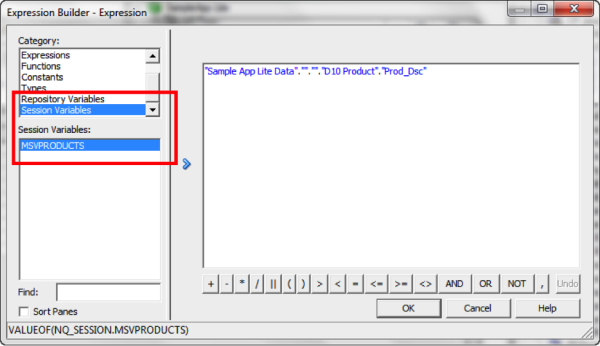
In addition to supporting regular session variables that are populated from one data source, Oracle Business Intelligence 11.1.1.7.0 also supports session variables that can be populated from multiple data sources. These multi-source session variables can be used in logical queries or in repository data filters and contain the union of values from the different data sources. There is no restriction on the number of values that the multi-source session variable can hold. To create a multi-source session variable, you first create row-wise initialization blocks for each source.
by Nancy Hamilton
Join me as I will be representing KPI University at KScope 2013, the Oracle Development Tools User Group (ODTUG)...
by Nancy Hamilton
Join me as I will be representing KPI University at KScope 2013, the Oracle Development Tools User Group (ODTUG) Conference, June 23 – 27 in the exciting city of New Orleans. Register to attend one of our two hands-on BI labs featuring OBIEE 11g Analysis and Dashboards. See you in New Orleans!
by Kurt Wolff
It may be strange to be writing this with the intention of posting to a blog, but I thought someone should step back a...
by Kurt Wolff
It may be strange to be writing this with the intention of posting to a blog, but I thought someone should step back a minute and issue a few words of warning about information that can be found on the web about Oracle BI EE.
by Shiva Molabanti
Prerequisites:
- OBIEE 11.1.1.7.1 (If your version of Oracle BI EE is not 11.1.1.7.1, download Patch 16556157: OBIEE BUNDLE PATCH 11.1.1.7.1 from My Oracle Support).
- To support Oracle BI Mobile App Designer with Oracle BI Web Catalog, Apply OBIEE 11.1.1.7.1 MLR Patch 17004920.
- Download Oracle BI Mobile App Designer Patch 17220944 from My Oracle Support.
Installation Steps:
- Stop All OBIEE 11G services (Weblogic Admin Server, Managed Server and OPMN services).
- Apply OBIEE 11.1.1.7.1 MLR Patch 17004920 using OPatch Utility.
- Apply Oracle BI Mobile App designer Patch 17220944 using OPatch Utility.
- Deploy the Oracle BI Mobile App Designer (MAD) manually using Weblogic Configuration Assistant as shown below.
- Open Command prompt window and Navigate to: <MW_HOME>\Oracle_BI1\common\bin
- Run "config.bat" to start the WebLogic Configuration Assistant Tool.
On welcome screen, select ‘"Extend an existing WebLogic domain" and click "Next."
by Veera Reddy Ramidi
This blog introduces and explains the detailed step by step process for executing the Domain Load to Business Analytics Warehouse. Here, we are illustrating for the Student information Analytics data using the new OBIA 11g which is supported only for PeopleSoft 9.0 Campus Solutions. This blog can be used similarly for any other Analytics using OBIA 11g.
The BI Apps from Oracle present customers with a nice head start to getting their BI environment up and running. But for many customers, their user community demands lighting-fast speeds while running dashboards, reports and ad-hoc queries.
by Shiva Molabanti
Version 11.1.1.7.0 of Oracle Business Intelligence Enterprise Edition (OBIEE) Supports Multiple-Source Session Variables
In addition to supporting regular session variables that are populated from one data source, Oracle Business Intelligence 11.1.1.7.0 also supports session variables that can be populated from multiple data sources. These multi-source session variables can be used in logical queries or in repository data filters and contain the union of values from the different data sources. There is no restriction on the number of values that the multi-source session variable can hold. To create a multi-source session variable, you first create row-wise initialization blocks for each source.
by Nancy Hamilton
Join me as I will be representing KPI University at KScope 2013, the Oracle Development Tools User Group (ODTUG) Conference, June 23 – 27 in the exciting city of New Orleans. Register to attend one of our two hands-on BI labs featuring OBIEE 11g Analysis and Dashboards. See you in New Orleans!
by Kurt Wolff
It may be strange to be writing this with the intention of posting to a blog, but I thought someone should step back a minute and issue a few words of warning about information that can be found on the web about Oracle BI EE.