

This blog post offers an insight into the features and functionalities of Google Data Studio and compares it with...

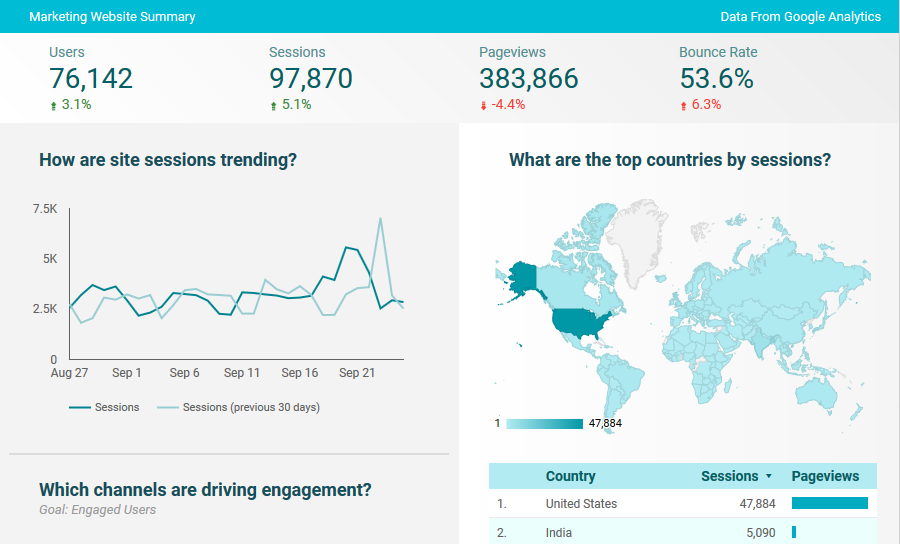
This blog post offers an insight into the features and functionalities of Google Data Studio and compares it with popular data analysis tools like Tableau, QlikView and new entrants like Power BI.
Disclaimer: This article and all features assessed are as on Sep, 2017 and subject to modifications / enhancements by Google.

by Avinash Mohan
Exploring the different ways Tableau connects to data and whether dimensional modeling is necessary when using Tableau’s...
by Avinash Mohan
Exploring the different ways Tableau connects to data and whether dimensional modeling is necessary when using Tableau’s architecture.
Architecture
Tableau has two primary ways to connect to data sources and work with them as shown in this simplified architecture diagram shown below .
by Kumar Krishnaswamy
A quick Google search for “Tableau Data Security” returns a link to a Tableau knowledge base article for User...
by Kumar Krishnaswamy
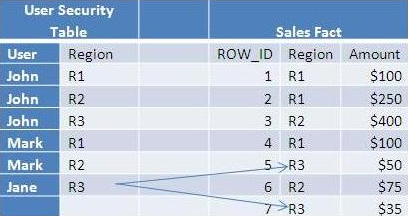
A quick Google search for “Tableau Data Security” returns a link to a Tableau knowledge base article for User Filters and Row Level Security. The knowledge base article clearly lays out the options available for implementing data security – defined as the ability to control what data a user sees. The goal here is to not regurgitate that content, but to examine each of the two data security options laid out by Tableau and determine how they fit various use cases in the enterprise context.


This blog post offers an insight into the features and functionalities of Google Data Studio and compares it with popular data analysis tools like Tableau, QlikView and new entrants like Power BI.
Disclaimer: This article and all features assessed are as on Sep, 2017 and subject to modifications / enhancements by Google.
by Avinash Mohan
Exploring the different ways Tableau connects to data and whether dimensional modeling is necessary when using Tableau’s architecture.
Architecture
Tableau has two primary ways to connect to data sources and work with them as shown in this simplified architecture diagram shown below .
by Kumar Krishnaswamy
A quick Google search for “Tableau Data Security” returns a link to a Tableau knowledge base article for User Filters and Row Level Security. The knowledge base article clearly lays out the options available for implementing data security – defined as the ability to control what data a user sees. The goal here is to not regurgitate that content, but to examine each of the two data security options laid out by Tableau and determine how they fit various use cases in the enterprise context.
