
Redefine what's
possible
Which reports can we delete?
That is the wrong place to start.
Before you migrate, BI Backlog scores every Tableau asset against
your data model, KPIs, and grain — and hands you a prioritized
action plan with evidence behind every call.
The three hard gates
Most BI consolidation projects skip
the questions that matter.
Same Data Model?
Same KPI Definitions?
Compatible Grain?
METADATA
Harvest
Tableau REST + GraphQL pulls every workbook, dashboard, datasource, field, and lineage relationship.
SIMILARITY
Score
Jaccard overlap on fields, MD5-hashed KPI signatures, view structure matching, data model comparison.
GUARDRAILS
Block
Tableau REST + GraphQL pulls every workbook, dashboard, datasource, field, and lineage relationship.
OUTPUT
Decide
A ranked backlog: KEEP, CONSOLIDATE, RETIRE, REDESIGN. Every call traces back to its evidence.
The scoring model Weighted, explainable, auditable

![]()
![]()
![]()
![]()

A real assessment
947 dashboards in. A prioritized backlog out.
From a recent KPI Partners assessment of a real Tableau environment.
Every count below ties back to evidence in a 28-page report.

What you get
Six deliverables. One source of truth.
Full asset inventory
Every workbook, dashboard, datasource, and database connection — catalogued with owners, usage, and lineage.
End-to-end lineage
Three-layer graph from raw tables → calculated fields → presentation. Impact analysis becomes one click.
Business glossary
Top fields and KPIs ranked by usage. Surfaces the de facto vocabulary that should be formally certified.
KPI conflict report
Every metric with the same name but a different formula. Standardization is required before consolidation.
Action backlog
Every dashboard classified — KEEP, CONSOLIDATE, RETIRE, REDESIGN — with the evidence behind each call.
Owner validation prompts
Generated questions for every business decision. The work to approve a recommendation is structured, not improvised.
Engagement timeline
From kickoff to backlog in three weeks.
Connect & harvest
Week 1
Personal access token configured. Tableau Server or Cloud metadata fully extracted via REST and GraphQL APIs. Lineage graph built.
Decide & ship
Week 2
Owner validation prompts circulated. Final action backlog signed off. Migration plan prioritized by evidence, not opinion.
Score & validate
Week 3
Similarity engine runs. Guardrails applied. Initial backlog generated. KPI conflicts and grain mismatches surfaced for review.
Frequently asked questions
Does BI Backlog need access to our actual data?
No. The tool reads Tableau metadata via the REST and Metadata GraphQL APIs only — workbook structures, field definitions, lineage, and usage statistics. Row-level data never leaves your environment. A Personal Access Token with read-only scope is sufficient.
What's the difference between BI Backlog and a "BI audit"?
A BI audit gives you a list of duplicates and a summary slide. BI Backlog gives you a ranked action plan — every recommendation classified (KEEP / CONSOLIDATE / RETIRE / REDESIGN), traced to its evidence, and paired with an owner-validation prompt. The deliverable is a backlog you can execute against, not a report you'll never reread.
What if our environment is mid-migration already?
Run the scan now anyway. The most expensive mistakes happen in migrations that proceed without knowing which assets are duplicates, which have KPI conflicts, and which can't be merged due to grain. Catching these mid-flight is cheaper than catching them post-cutover.
How is this different from Tableau's own Data Catalog?
Data Catalog tells you what exists. BI Backlog tells you what to do about it. Our scoring model, KPI signature matching, grain detection, and decision engine sit on top of the metadata Catalog exposes — turning a passive inventory into a prioritized action plan.
What does an assessment cost?
Pricing depends on the size of your Tableau estate (workbook count, datasource count, user count). A typical assessment for a mid-size environment is scoped in a 30-minute call. Book a scan to get a quote tailored to your environment.
Is this Tableau-only, or do you cover Power BI / Looker?
The current engine is purpose-built for Tableau Server and Tableau Cloud. Power BI and Looker support are on the roadmap. If you have a multi-platform estate, talk to us — we can scope a custom assessment.
Stop guessing. Start with evidence.
Book a 30-minute scoping call. We'll walk you through a sample report
and outline what an assessment of your environment would look like.
Success Stories
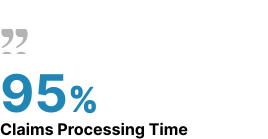
Reduced claims turnaround using AI-driven workflow automation, improving speed and consistency across operations.
![]()
Global Financial Services Leader
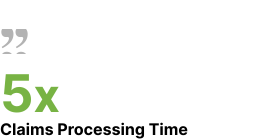
Enabled self-service access to ERP and analytics using governed GenAI, reducing IT dependency and improving decision speed.
![]()
Leading U.S. Beverage Manufacturer
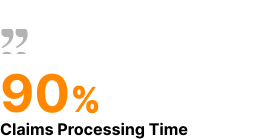
Improved reliability through predictive intelligence and root-cause analysis embedded into operational workflows.
![]()
Global Manufacturing Leader
Data Platform Migration for Modern Analytics
KPI DataBridge Suite is designed to help enterprises modernize their data and analytics infrastructure across:
BI Modernization 🔗
Data Platform Migration 🔗
Data Products 🔗