

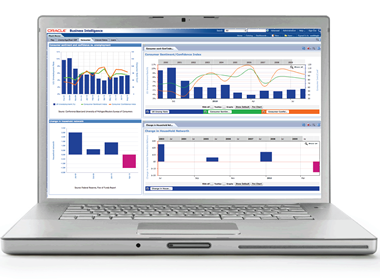
The team of Sid Goel, Kusal Swarnakar, and Sid Singh collaborated on a webinar last week that covered the much misunderstood subject of...

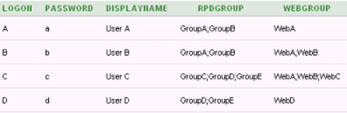
by Kurt Wolff
I thought it would be worth exploring the interrelated topics of repository groups, web groups, system session variables,...
by Kurt Wolff
I thought it would be worth exploring the interrelated topics of repository groups, web groups, system session variables, Delivers, the SA System subject area, and My Account.

| 2011 KPI Napa Valley Wine Tour |
On Sunday of Oracle OpenWorld week, guests joined KPI Partners on an exclusive full day winery...
| 2011 KPI Napa Valley Wine Tour |
On Sunday of Oracle OpenWorld week, guests joined KPI Partners on an exclusive full day winery tour through Napa Valley. Participants were transported via executive limo bus from San Francisco, provided tours of 3 Napa Valley wineries, and experienced a four-course lunch overlooking the hills of Napa.
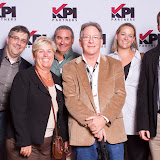
| 2011 KPI Partners Happy Hour at Oracle OpenWorld |
On Monday evening, all clients, partners, prospects, and friends were invited to...
| 2011 KPI Partners Happy Hour at Oracle OpenWorld |
On Monday evening, all clients, partners, prospects, and friends were invited to join us for good times, good music, complimentary cocktails and appetizers inside the Roundabout Theater @ Zeum.

Award Winning Business Intelligence Applications Solution Realized an ROI of $500 Thousand In The First Week
ORACLE OPENWORLD, San...
Award Winning Business Intelligence Applications Solution Realized an ROI of $500 Thousand In The First Week
ORACLE OPENWORLD, San Francisco, CA – October 3, 2011 – KPI Partners, a member of the Oracle® PartnerNetwork, is honored to be selected as Oracle’s 2011 recipient of the North America Titan Award in the ‘Business Intelligence Application Solution’ category. The awards are presented on Tuesday, October 4th during the Oracle North America Partner & Titan Award Gala held at San Francisco’s City Hall.
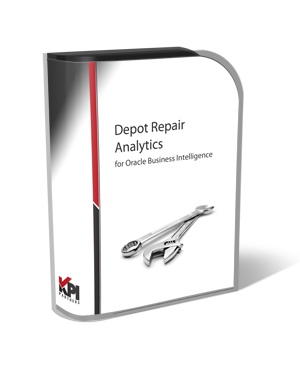
KPI Partners has developed a pre-built analytic application specifically designed for standard repair processes.
San Francisco, California...
KPI Partners has developed a pre-built analytic application specifically designed for standard repair processes.
San Francisco, California – October 2, 2011 -- KPI Partners today announced the introduction of Depot Repair Analytics for Oracle Business Intelligence, a solution developed for use with the Oracle Business Intelligence platform and the Oracle E-Business Suite Depot Repair module. KPI’s Depot Repair Analytics enable any organization to monitor and report on repair processes throughout the entire life cycle. Key analytical areas include Repair Orders, Estimates, and Shipping & Billing.

Oracle OpenWorld draws more than 45,000 attendees from 117 countries
San Francisco, California -- October 1, 2011 — KPI Partners, a leader...
Oracle OpenWorld draws more than 45,000 attendees from 117 countries
San Francisco, California -- October 1, 2011 — KPI Partners, a leader in Oracle Business Intelligence (BI) and Enterprise Performance Management (EPM), will be attending and exhibiting at Oracle OpenWorld 2011 from October 2-6. Leadership from KPI Partners will be on hand to discuss the company’s exclusive pre-built analytical solutions for Oracle BI, their award-winning solutions, and their EPM/Hyperion practice.
By Harisha Pattela
To install and configure BI Composer for Oracle BI EE, use the following steps as a guide:
Step 1
Extend a Web Logic...
By Harisha Pattela
To install and configure BI Composer for Oracle BI EE, use the following steps as a guide:
Step 1
Extend a Web Logic Server domain & to install BI Composer runtime implementation shared libraries:
- Stop the Web Logic Server.
- Launch the Configuration Wizard.
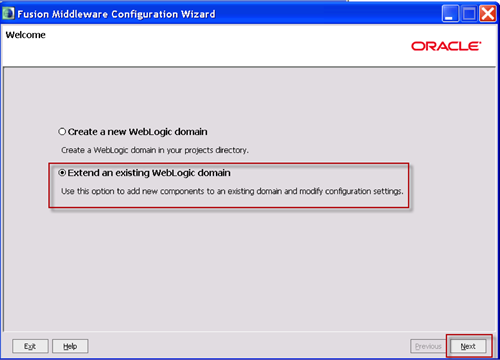
- Select Extend an existing Weblogic domain, and then click Next.
- Select the domain folder (for example, <mw_home>/user_projects/domains/bifoundation_domain), and then click Next.
By Kurt Wolff
When I read the questions people ask about data modeling on OBIEE forums, one that seems to come up frequently is what to do...
By Kurt Wolff
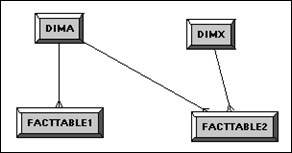
When I read the questions people ask about data modeling on OBIEE forums, one that seems to come up frequently is what to do when you have fact tables that do not join to all dimension tables.
By Kurt Wolff
“Writeback” – presenting an Answers interface so that users can update data in database tables or insert new rows – first...
By Kurt Wolff
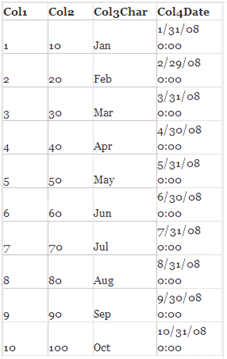
“Writeback” – presenting an Answers interface so that users can update data in database tables or insert new rows – first appeared in version 7.8.4. To use OBIEE’s writeback capabilities, there are several set up steps. While each one is simple and fairly straightforward, it’s easy to forget all the steps and where each one is located. This document contains the instructions in case you find yourself forgetting them. Since many people like to demo using Excel as a data source, it focuses first on using Excel. Later, an example using an Oracle table is discussed.


by Kurt Wolff
I thought it would be worth exploring the interrelated topics of repository groups, web groups, system session variables, Delivers, the SA System subject area, and My Account.
| 2011 KPI Napa Valley Wine Tour |
On Sunday of Oracle OpenWorld week, guests joined KPI Partners on an exclusive full day winery tour through Napa Valley. Participants were transported via executive limo bus from San Francisco, provided tours of 3 Napa Valley wineries, and experienced a four-course lunch overlooking the hills of Napa.
| 2011 KPI Partners Happy Hour at Oracle OpenWorld |
On Monday evening, all clients, partners, prospects, and friends were invited to join us for good times, good music, complimentary cocktails and appetizers inside the Roundabout Theater @ Zeum.
Award Winning Business Intelligence Applications Solution Realized an ROI of $500 Thousand In The First Week
ORACLE OPENWORLD, San Francisco, CA – October 3, 2011 – KPI Partners, a member of the Oracle® PartnerNetwork, is honored to be selected as Oracle’s 2011 recipient of the North America Titan Award in the ‘Business Intelligence Application Solution’ category. The awards are presented on Tuesday, October 4th during the Oracle North America Partner & Titan Award Gala held at San Francisco’s City Hall.
KPI Partners has developed a pre-built analytic application specifically designed for standard repair processes.
San Francisco, California – October 2, 2011 -- KPI Partners today announced the introduction of Depot Repair Analytics for Oracle Business Intelligence, a solution developed for use with the Oracle Business Intelligence platform and the Oracle E-Business Suite Depot Repair module. KPI’s Depot Repair Analytics enable any organization to monitor and report on repair processes throughout the entire life cycle. Key analytical areas include Repair Orders, Estimates, and Shipping & Billing.
Oracle OpenWorld draws more than 45,000 attendees from 117 countries
San Francisco, California -- October 1, 2011 — KPI Partners, a leader in Oracle Business Intelligence (BI) and Enterprise Performance Management (EPM), will be attending and exhibiting at Oracle OpenWorld 2011 from October 2-6. Leadership from KPI Partners will be on hand to discuss the company’s exclusive pre-built analytical solutions for Oracle BI, their award-winning solutions, and their EPM/Hyperion practice.
By Harisha Pattela
To install and configure BI Composer for Oracle BI EE, use the following steps as a guide:
Step 1
Extend a Web Logic Server domain & to install BI Composer runtime implementation shared libraries:
- Stop the Web Logic Server.
- Launch the Configuration Wizard.
- Select Extend an existing Weblogic domain, and then click Next.
- Select the domain folder (for example, <mw_home>/user_projects/domains/bifoundation_domain), and then click Next.
By Kurt Wolff
When I read the questions people ask about data modeling on OBIEE forums, one that seems to come up frequently is what to do when you have fact tables that do not join to all dimension tables.
By Kurt Wolff
“Writeback” – presenting an Answers interface so that users can update data in database tables or insert new rows – first appeared in version 7.8.4. To use OBIEE’s writeback capabilities, there are several set up steps. While each one is simple and fairly straightforward, it’s easy to forget all the steps and where each one is located. This document contains the instructions in case you find yourself forgetting them. Since many people like to demo using Excel as a data source, it focuses first on using Excel. Later, an example using an Oracle table is discussed.
