

by Shiva Molabanti
The Oracle Data Integrator platform integrates into the broader Fusion Middleware platform and becomes a key component...

by Shiva Molabanti
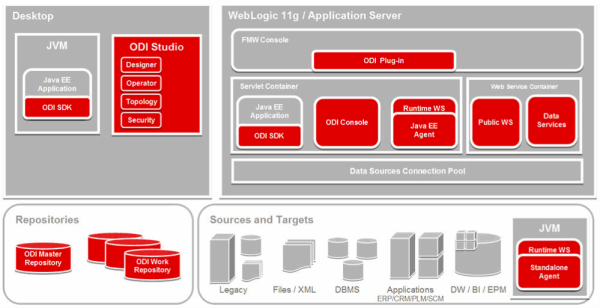
The Oracle Data Integrator platform integrates into the broader Fusion Middleware platform and becomes a key component of this stack. Oracle Data Integrator provides it's run-time components as Java EE applications, enhanced to fully leverage the capabilities of the Oracle WebLogic Application Server. Oracle Data Integrator components include the FMW exclusive features for Enterprise-Scale Deployments, high availability, scalability, and hardened security.
by Veera Reddy Ramidi
This blog introduces and explains the detailed step by step process for executing the Domain Load to Business...
by Veera Reddy Ramidi
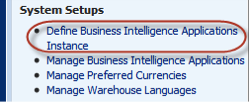
This blog introduces and explains the detailed step by step process for executing the Domain Load to Business Analytics Warehouse. Here, we are illustrating for the Student information Analytics data using the new OBIA 11g which is supported only for PeopleSoft 9.0 Campus Solutions. This blog can be used similarly for any other Analytics using OBIA 11g.

FSG is a report-building tool for Oracle E-Business Suite used for creating financial statements such as the income statement, trial...
FSG is a report-building tool for Oracle E-Business Suite used for creating financial statements such as the income statement, trial balance, balance sheet, and cash flow statement. FSG reports typically are complex to build, difficult to maintain, and do not provide the modern analytical capabilities that exist with the Oracle Business Intelligence platform.

The BI Apps from Oracle present customers with a nice head start to getting their BI environment up and running. But for many customers,...
The BI Apps from Oracle present customers with a nice head start to getting their BI environment up and running. But for many customers, their user community demands lighting-fast speeds while running dashboards, reports and ad-hoc queries.
by Shiva Molabanti
Version 11.1.1.7.0 of Oracle Business Intelligence Enterprise Edition (OBIEE) Supports Multiple-Source Session Variables
by Shiva Molabanti
Version 11.1.1.7.0 of Oracle Business Intelligence Enterprise Edition (OBIEE) Supports Multiple-Source Session Variables
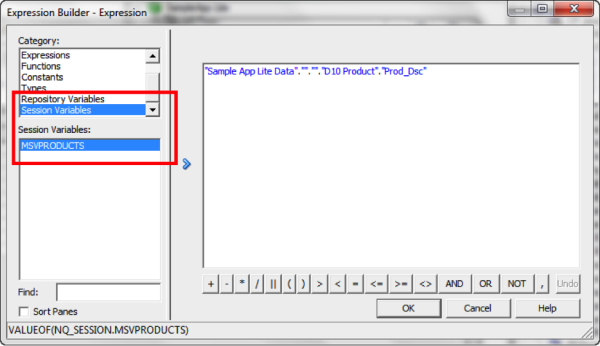
In addition to supporting regular session variables that are populated from one data source, Oracle Business Intelligence 11.1.1.7.0 also supports session variables that can be populated from multiple data sources. These multi-source session variables can be used in logical queries or in repository data filters and contain the union of values from the different data sources. There is no restriction on the number of values that the multi-source session variable can hold. To create a multi-source session variable, you first create row-wise initialization blocks for each source.
by Nancy Hamilton
Join me as I will be representing KPI University at KScope 2013, the Oracle Development Tools User Group (ODTUG)...
by Nancy Hamilton
Join me as I will be representing KPI University at KScope 2013, the Oracle Development Tools User Group (ODTUG) Conference, June 23 – 27 in the exciting city of New Orleans. Register to attend one of our two hands-on BI labs featuring OBIEE 11g Analysis and Dashboards. See you in New Orleans!
by Kurt Wolff
It may be strange to be writing this with the intention of posting to a blog, but I thought someone should step back a...
by Kurt Wolff
It may be strange to be writing this with the intention of posting to a blog, but I thought someone should step back a minute and issue a few words of warning about information that can be found on the web about Oracle BI EE.
by Kurt Wolff
Suppose you have a series of datetime pairs in Oracle BI... The problem is to display the differences between DATE1 and...
by Kurt Wolff
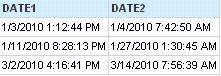
Suppose you have a series of datetime pairs in Oracle BI... The problem is to display the differences between DATE1 and DATE2 in days, hours, minutes, and seconds.
by Kurt Wolff
Row level security (constraining a user’s view of the data to rows which meet pre-defined criteria) is a common requirement...
by Kurt Wolff
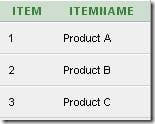
Row level security (constraining a user’s view of the data to rows which meet pre-defined criteria) is a common requirement in OBIEE. This post will explore this topic, using a simple schema with a single fact table and three dimension tables, built around the theme of retail sales.
by Kurt Wolff
Suppose you have a dashboard with three pages (tabs). Suppose further that not every user should see all three tabs. Most...
by Kurt Wolff
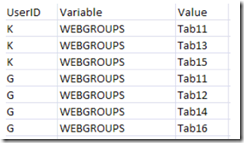
Suppose you have a dashboard with three pages (tabs). Suppose further that not every user should see all three tabs. Most users will see a limited set of the tabs – some will see two, some will see only one. You want to define web groups to cover all the possible combinations. How many web groups would you have to create?


by Shiva Molabanti
The Oracle Data Integrator platform integrates into the broader Fusion Middleware platform and becomes a key component of this stack. Oracle Data Integrator provides it's run-time components as Java EE applications, enhanced to fully leverage the capabilities of the Oracle WebLogic Application Server. Oracle Data Integrator components include the FMW exclusive features for Enterprise-Scale Deployments, high availability, scalability, and hardened security.
by Veera Reddy Ramidi
This blog introduces and explains the detailed step by step process for executing the Domain Load to Business Analytics Warehouse. Here, we are illustrating for the Student information Analytics data using the new OBIA 11g which is supported only for PeopleSoft 9.0 Campus Solutions. This blog can be used similarly for any other Analytics using OBIA 11g.
FSG is a report-building tool for Oracle E-Business Suite used for creating financial statements such as the income statement, trial balance, balance sheet, and cash flow statement. FSG reports typically are complex to build, difficult to maintain, and do not provide the modern analytical capabilities that exist with the Oracle Business Intelligence platform.
The BI Apps from Oracle present customers with a nice head start to getting their BI environment up and running. But for many customers, their user community demands lighting-fast speeds while running dashboards, reports and ad-hoc queries.
by Shiva Molabanti
Version 11.1.1.7.0 of Oracle Business Intelligence Enterprise Edition (OBIEE) Supports Multiple-Source Session Variables
In addition to supporting regular session variables that are populated from one data source, Oracle Business Intelligence 11.1.1.7.0 also supports session variables that can be populated from multiple data sources. These multi-source session variables can be used in logical queries or in repository data filters and contain the union of values from the different data sources. There is no restriction on the number of values that the multi-source session variable can hold. To create a multi-source session variable, you first create row-wise initialization blocks for each source.
by Nancy Hamilton
Join me as I will be representing KPI University at KScope 2013, the Oracle Development Tools User Group (ODTUG) Conference, June 23 – 27 in the exciting city of New Orleans. Register to attend one of our two hands-on BI labs featuring OBIEE 11g Analysis and Dashboards. See you in New Orleans!
by Kurt Wolff
It may be strange to be writing this with the intention of posting to a blog, but I thought someone should step back a minute and issue a few words of warning about information that can be found on the web about Oracle BI EE.
by Kurt Wolff
Suppose you have a series of datetime pairs in Oracle BI... The problem is to display the differences between DATE1 and DATE2 in days, hours, minutes, and seconds.
by Kurt Wolff
Row level security (constraining a user’s view of the data to rows which meet pre-defined criteria) is a common requirement in OBIEE. This post will explore this topic, using a simple schema with a single fact table and three dimension tables, built around the theme of retail sales.
by Kurt Wolff
Suppose you have a dashboard with three pages (tabs). Suppose further that not every user should see all three tabs. Most users will see a limited set of the tabs – some will see two, some will see only one. You want to define web groups to cover all the possible combinations. How many web groups would you have to create?
