


by Shiva Molabanti
Oracle Business Intelligence Cloud Service (BICS) - Every organization should carefully evaluate the tool, as well as...
by Shiva Molabanti
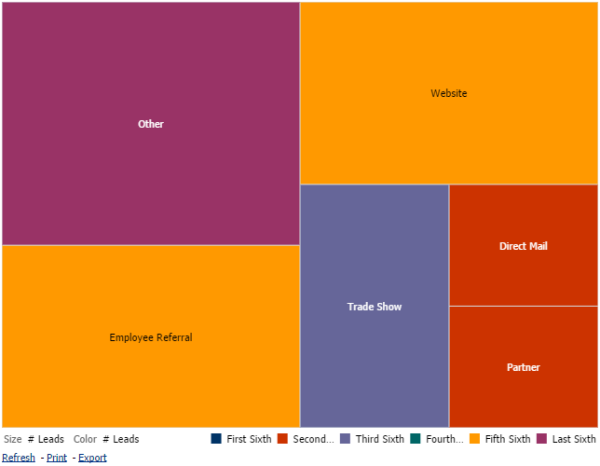
Oracle Business Intelligence Cloud Service (BICS) - Every organization should carefully evaluate the tool, as well as its potential for end-user adoption.
In today’s technological landscape there’s an ever-accelerating demand for increased efficiency and effectiveness. An organization, before evaluating a new solution, must consider end-user adoption for every technology prior to implementation, particularly when the cost of deployment and training are often driven by the rate of user adoption.
by Shiva Molabanti
Prerequisites:
- OBIEE 11.1.1.7.1 (If your version of Oracle BI EE is not 11.1.1.7.1, download Patch 16556157: OBIEE...
by Shiva Molabanti
Prerequisites:
- OBIEE 11.1.1.7.1 (If your version of Oracle BI EE is not 11.1.1.7.1, download Patch 16556157: OBIEE BUNDLE PATCH 11.1.1.7.1 from My Oracle Support).
- To support Oracle BI Mobile App Designer with Oracle BI Web Catalog, Apply OBIEE 11.1.1.7.1 MLR Patch 17004920.
- Download Oracle BI Mobile App Designer Patch 17220944 from My Oracle Support.
Installation Steps:
- Stop All OBIEE 11G services (Weblogic Admin Server, Managed Server and OPMN services).
- Apply OBIEE 11.1.1.7.1 MLR Patch 17004920 using OPatch Utility.
- Apply Oracle BI Mobile App designer Patch 17220944 using OPatch Utility.
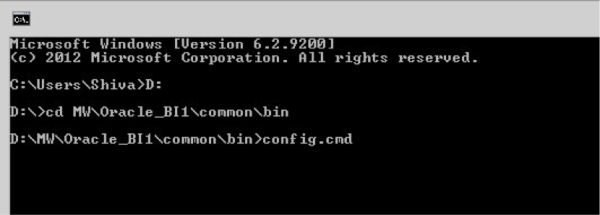
- Deploy the Oracle BI Mobile App Designer (MAD) manually using Weblogic Configuration Assistant as shown below.
- Open Command prompt window and Navigate to: <MW_HOME>\Oracle_BI1\common\bin
- Run "config.bat" to start the WebLogic Configuration Assistant Tool.
On welcome screen, select ‘"Extend an existing WebLogic domain" and click "Next."
by Shiva Molabanti
The Oracle Data Integrator platform integrates into the broader Fusion Middleware platform and becomes a key component...
by Shiva Molabanti
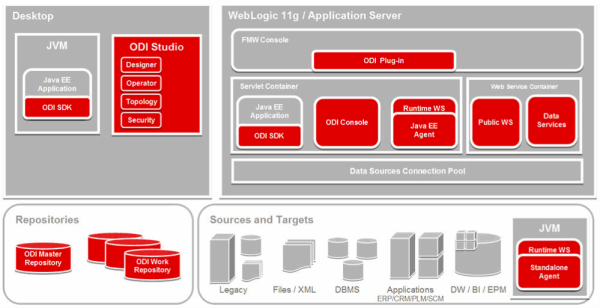
The Oracle Data Integrator platform integrates into the broader Fusion Middleware platform and becomes a key component of this stack. Oracle Data Integrator provides it's run-time components as Java EE applications, enhanced to fully leverage the capabilities of the Oracle WebLogic Application Server. Oracle Data Integrator components include the FMW exclusive features for Enterprise-Scale Deployments, high availability, scalability, and hardened security.
by Shiva Molabanti
Version 11.1.1.7.0 of Oracle Business Intelligence Enterprise Edition (OBIEE) Supports Multiple-Source Session Variables
by Shiva Molabanti
Version 11.1.1.7.0 of Oracle Business Intelligence Enterprise Edition (OBIEE) Supports Multiple-Source Session Variables
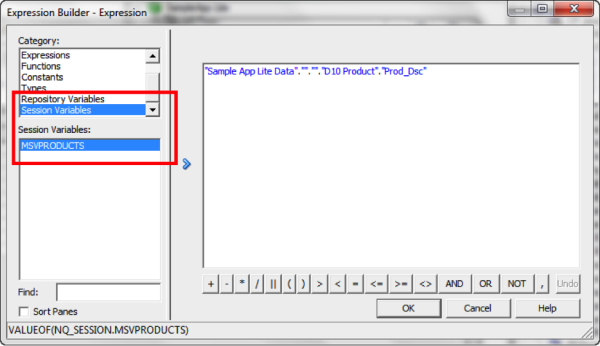
In addition to supporting regular session variables that are populated from one data source, Oracle Business Intelligence 11.1.1.7.0 also supports session variables that can be populated from multiple data sources. These multi-source session variables can be used in logical queries or in repository data filters and contain the union of values from the different data sources. There is no restriction on the number of values that the multi-source session variable can hold. To create a multi-source session variable, you first create row-wise initialization blocks for each source.


by Shiva Molabanti
Oracle Business Intelligence Cloud Service (BICS) - Every organization should carefully evaluate the tool, as well as its potential for end-user adoption.
In today’s technological landscape there’s an ever-accelerating demand for increased efficiency and effectiveness. An organization, before evaluating a new solution, must consider end-user adoption for every technology prior to implementation, particularly when the cost of deployment and training are often driven by the rate of user adoption.
by Shiva Molabanti
Prerequisites:
- OBIEE 11.1.1.7.1 (If your version of Oracle BI EE is not 11.1.1.7.1, download Patch 16556157: OBIEE BUNDLE PATCH 11.1.1.7.1 from My Oracle Support).
- To support Oracle BI Mobile App Designer with Oracle BI Web Catalog, Apply OBIEE 11.1.1.7.1 MLR Patch 17004920.
- Download Oracle BI Mobile App Designer Patch 17220944 from My Oracle Support.
Installation Steps:
- Stop All OBIEE 11G services (Weblogic Admin Server, Managed Server and OPMN services).
- Apply OBIEE 11.1.1.7.1 MLR Patch 17004920 using OPatch Utility.
- Apply Oracle BI Mobile App designer Patch 17220944 using OPatch Utility.
- Deploy the Oracle BI Mobile App Designer (MAD) manually using Weblogic Configuration Assistant as shown below.
- Open Command prompt window and Navigate to: <MW_HOME>\Oracle_BI1\common\bin
- Run "config.bat" to start the WebLogic Configuration Assistant Tool.
On welcome screen, select ‘"Extend an existing WebLogic domain" and click "Next."
by Shiva Molabanti
The Oracle Data Integrator platform integrates into the broader Fusion Middleware platform and becomes a key component of this stack. Oracle Data Integrator provides it's run-time components as Java EE applications, enhanced to fully leverage the capabilities of the Oracle WebLogic Application Server. Oracle Data Integrator components include the FMW exclusive features for Enterprise-Scale Deployments, high availability, scalability, and hardened security.
by Shiva Molabanti
Version 11.1.1.7.0 of Oracle Business Intelligence Enterprise Edition (OBIEE) Supports Multiple-Source Session Variables
In addition to supporting regular session variables that are populated from one data source, Oracle Business Intelligence 11.1.1.7.0 also supports session variables that can be populated from multiple data sources. These multi-source session variables can be used in logical queries or in repository data filters and contain the union of values from the different data sources. There is no restriction on the number of values that the multi-source session variable can hold. To create a multi-source session variable, you first create row-wise initialization blocks for each source.
