

by Shiva Molabanti
Prerequisites:
- OBIEE 11.1.1.7.1 (If your version of Oracle BI EE is not 11.1.1.7.1, download Patch 16556157: OBIEE...
Learn More

by Shiva Molabanti
Prerequisites:
- OBIEE 11.1.1.7.1 (If your version of Oracle BI EE is not 11.1.1.7.1, download Patch 16556157: OBIEE BUNDLE PATCH 11.1.1.7.1 from My Oracle Support).
- To support Oracle BI Mobile App Designer with Oracle BI Web Catalog, Apply OBIEE 11.1.1.7.1 MLR Patch 17004920.
- Download Oracle BI Mobile App Designer Patch 17220944 from My Oracle Support.
Installation Steps:
- Stop All OBIEE 11G services (Weblogic Admin Server, Managed Server and OPMN services).
- Apply OBIEE 11.1.1.7.1 MLR Patch 17004920 using OPatch Utility.
- Apply Oracle BI Mobile App designer Patch 17220944 using OPatch Utility.
- Deploy the Oracle BI Mobile App Designer (MAD) manually using Weblogic Configuration Assistant as shown below.
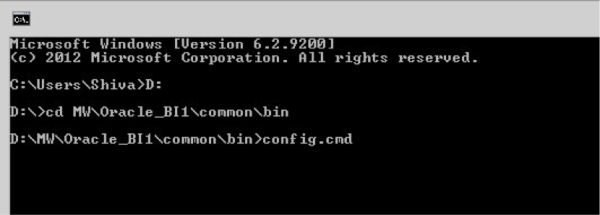
- Open Command prompt window and Navigate to: <MW_HOME>\Oracle_BI1\common\bin
- Run "config.bat" to start the WebLogic Configuration Assistant Tool.
On welcome screen, select ‘"Extend an existing WebLogic domain" and click "Next."


by Shiva Molabanti
Prerequisites:
- OBIEE 11.1.1.7.1 (If your version of Oracle BI EE is not 11.1.1.7.1, download Patch 16556157: OBIEE BUNDLE PATCH 11.1.1.7.1 from My Oracle Support).
- To support Oracle BI Mobile App Designer with Oracle BI Web Catalog, Apply OBIEE 11.1.1.7.1 MLR Patch 17004920.
- Download Oracle BI Mobile App Designer Patch 17220944 from My Oracle Support.
Installation Steps:
- Stop All OBIEE 11G services (Weblogic Admin Server, Managed Server and OPMN services).
- Apply OBIEE 11.1.1.7.1 MLR Patch 17004920 using OPatch Utility.
- Apply Oracle BI Mobile App designer Patch 17220944 using OPatch Utility.
- Deploy the Oracle BI Mobile App Designer (MAD) manually using Weblogic Configuration Assistant as shown below.
- Open Command prompt window and Navigate to: <MW_HOME>\Oracle_BI1\common\bin
- Run "config.bat" to start the WebLogic Configuration Assistant Tool.
On welcome screen, select ‘"Extend an existing WebLogic domain" and click "Next."
